Thursday, April 27, 2017

8th day 26.04.2017

Welcome.

 We studied about the GitHub.

First time I know the GitHub & facilities.

How to create the GitHub account?

  1. In the upper-right corner of any page, click , and then click New repository
  2. Type a short, memorable name for your repository. For example, "hello-world".
  3. Optionally, add a description of your repository. For example, "My first repository on GitHub."
  4. Choose between creating a public or private repository.
    • Public repositories are a great choice for getting started. They're visible to any user on GitHub, so you can benefit from a collaborative community.
    • Radio buttons to select private or public status 
    • Private repositories require a little more setup. They're only available to you, the repository owner, as well as any collaborators you choose to share with. Private repositories are only available for paid accounts. For more information, see "GitHub's billing plans."
  5. Select Initialize this repository with a README.
  6. Click Create repository.
Then, successful create our GitHub account.

Why we are use GitHub account?
GitHub is a Git repository hosting service, but it adds many of its own features. While Git is a command line tool, GitHub provides a Web-based graphical interface. It also provides access control and several collaboration features, such as a wikis and basic task management tools for every project.


 How to upload files from PC?
 You can click the “Upload files” button in the toolbar at the top of the file tree. Or, you can drag and drop files from your desktop onto the file tree. Once you've added all the files you want to upload, you can commit them directly to your default branch or create a new branch and open a pull request.

Thankyou.

Wednesday, April 26, 2017

7th day 25.04.2017

Welcome.

Culture Diversity in the Work Place.

What's culture?
The sum of attitudes, customs, and beliefs that distinguishes one group of people from another. Culture is transmitted, through language, material objects, ritual, institutions, and art, from one generation to the next.

We discuss about the  Culture Diversity in the Work Place What are the problems?
that is,
  • lifestyle.
  • Experience.
  • Beliefs.
  • Knowledge.
  • Attitudes.  
Culture diversity in the workplace provides strength.  

Cultural Awareness. 

I know your own culture background. 
Recognise your own stereotypes & biases.

Body language. 

How does body speak?
like eny spoken language, body language has words, sentences & punctuation.
  • Head
  • Face
  • Eye
  • Nose
  • Cheeks
  • Lips & Mouth
  • Arms
  • Hands
  • Fingers
  • Leg & Feet
  • Walking.

Then, we studied some important html session today.
there are how to create the text box & how to create the radio button, text area, check box.
we do some exercises in HTML, done one exercises.


Tuesday, April 25, 2017

6th Day 24.04.2017

 Welcome to 1st class of 2nd week.


What's the DNS?
   DNS-Domain Name System
   The Internet's system for converting alphabetic names into numeric IP    
   addresses.

What's the protocol?
   Protocols are often described in an industry or international standard.
   protocols is control many programs. that is very important for good process.

What's the IP? 
   IP- Internet Protocol.
   An IP address is an identifier for a computer or device on a TCP/IP network...  
   Contrast with IP, which specifies the format of packets, also called datagrams,
   and the addressing scheme.

What's the DOM? 
   DOM- Document Object Model.
   DOM is an application programming interface for valid HTML and 
   well-formed XML documents. It defines the logical structure of documents and
  the way a document is accessed and manipulated. 

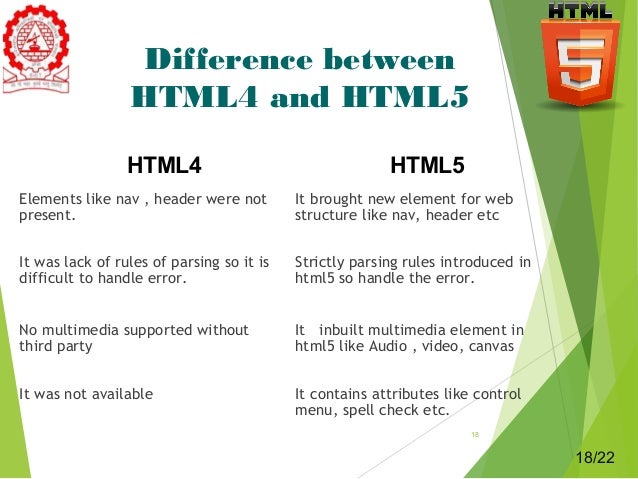
What's the difference between HTML4 and HTML5?
  HTML5 is last version. this is has some advantage from HTML4.
  
   Image result for what's the difference between html4 and html5
    
Then, we studied what are tags are using in HTML?
Basic HTML format?
    <!DOCTYPE html>
   <html>
   <body>
   <h1>My First Heading</h1>
   <p>My first paragraph.</p> 
   </body>
   </html>
We studied else some tags & perfect done.
  that is,
<!--...-->     Defines a comment
<!DOCTYPE>      Defines the document type
<a>     Defines a hyperlink
<b>     Defines bold text
<body>     Defines the document's body
<br>     Defines a single line break
<del>     Defines text that has been deleted from a document
<details>     Defines additional details that the user can view or hide
<em>     Defines emphasized text 
<embed>     Defines a container for an external (non-HTML) application
<h1> to <h6>     Defines HTML headings
<head>     Defines information about the document
<header>     Defines a header for a document or section
<hr>     Defines a thematic change in the content
<html>     Defines the root of an HTML document
<i>     Defines a part of text in an alternate voice or mood
<link>     Defines the relationship between a document and an external resource
<mark>     Defines marked/highlighted text
<img>     Defines an image
<ins>     Defines a text that has been inserted into a document
<meta>     Defines metadata about an HTML document
<p>     Defines a paragraph
<strong>     Defines important text
<style>     Defines style information for a document
<sub>     Defines subscripted text
<sup>     Defines superscripted text
<table>     Defines a table
<th>     Defines a header cell in a table
 

Thankyou.


Monday, April 24, 2017

5h day 21.04.2017

Welcome.


We participated one personal development session. that was a game. I like it.
But, I can't understand some new vocabulary. then, manage it.

We wrote our personal Strength, Weakness, Opportunity, Threats. After, every student met the personal catching lecture & got some good ideas for our future life in the personal field.
I got the ideas also very very useful our future ambition.
I'll keep the ideas.

We did the homework. & recheck it.
that is flowchart.

Image result for flowchart
We studied what's the webpage?
   Web page is a document that is suitable for the World Wide Web and web     
   browsers. A web browser displays a web page on a monitor or mobile device

What's the website?
   A website is a collection of related web pages.

What's the web server? & how to work?
  A web server is a computer system that processes requests via HTTP, the basic
  network protocol used to distribute information on the World Wide Web.
  web server make a connection user with server.

How to develop the web site & use the lanquages?
  •   Front design - HTML , CSS
  •   Client side - Java script
  •   Server side - PHP , Node.js , Ruby , python.
  •   Data base - SQL
 Related image

1st time I met the toastmasters & participated model meeting in toastmasters gavel club.
so, I was happy & like it.
I think, everyone like that.

Thank you.


Thursday, April 20, 2017

4th day 20.04.2017

Welcome to 4th day class. 
 
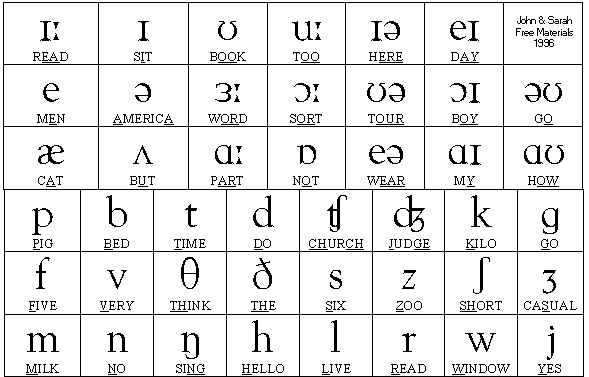
We listen to the audio clip in English.
done some exercise & find the some countries in world map.
some pronouns exercise.
that is,
Image result for sound of english

We check the our home work & finished.
Studied Nano Editor shortcut & practised.
such as, 

  • Remove the line-  Ctrl + k
  • Copy - Ctrl + m
  • Paste - Ctrl + u
  • Delete - Ctrl -k
  • Save -  Ctrl + o
  • Cancel -  Ctrl + c
  • Read the file  Ctrl + c
  • Exit -  Ctrl + x 

We studied Flow chard basic symbols & some exercise.
Image result for input output symbol in flowchart 


Thankyou.

3rd class 19.04.2017

09:00 to 09:30
Using library in British Council.

09:30 to 12:00
We met the British lecture & studied our future syllabus.

01:00 to 05:00
We studied how to use the Terminal , how to write the pseudo code
we learned what is pseudo code , why we use  pseudo code & Terminal commands. 

Thankyou.

Wednesday, April 19, 2017

2nd class 18.04.2017

09:00 to 09:30
Every one introduce the name throw game.

09:30 to 12:00
new personal coaching lecture came to our class.
she discus with me about the IT.
our group done the presentation. that is every one face the problems in IT companies.

13:00 to 15:45 
we studied about the computer, language VS program language & interpreter VS compiler
Every group finished presentation about the program language.

15:45 to 16:00
Tech talk introduction.

           Thankyou.

Monday, April 17, 2017

1st class 17.04.2017

1. first of all we know the uki's property.
2. we introduce our name to others.
3. first time i use the ubunthu & like it.
    we learn how to use the ubunthu from Internet & others
    ubunthu is a different Operating System
    because, i use windows & IOS even yet.
4. we download & installed Unity Tweak Tool
    but, not use even yet.
5. we installed another app is klavaro & using
    we learn how to speed type
    this typing is very easy.
6. I know about the Blogger & created
    Blogger also like it.